Showing posts with label Blackberry. Show all posts

Tutorial How to Inject Blackberry CDMA

  Step 1 ( Important!!! ):
  1. Buy a new SIM Card, here I use Smart Telecom, you can buy it at SMART Galeries
  2. Ask to the customer service 26 digits AKEY and 10 digits MIN ( without 510009 ) of your new SIM Card
  3. Download and Install QPST, you can DOWNLOAD Here!!!
  4. Blackberry Desktop Manager last version 
  5. Data Cable for Blackberry
  6. File PRL EVDO Smart Telecom (PRL ID 10009) DOWNLOAD Here!!! ( pass : retrasakti )
  7. Dial ##000000 for check CDMA Service Edit Screen
  8. Dial *4357# for ESN information
  9. Network Mode at device set to 1XEV Options >Mobile Network>Network Mode>1XEVDO
Step 2....:
-->


BlackBerry Phones Update/Flash Easy Way Without BlackBerry Desktop Manager


Here it's the easy way to update/flash Blackberrywithout Blackberry Desktop Manager
1: Download & instle the blackberry flashfile (no need instle blackberry desktop manager)

2: Delete the vendor.xml file located in c:\program files\common files\research in motion\apploader

3: With battery Connect your BlackBerry device to your computer

4: Run Loader from c:\program files\common files\research in motion\apploader & click Next

5: Select all software you want installed.

6: Proceed to the end portion untill you see the "Finish" button

7: Very IMPORTANT. do not hit the finish button, instead select the ADVANCED button.

8: Make sure both boxes are checked.

9: Proceed until it ask you if you want to automatically back up and restore, Select DO NOT AUTOMATICALLY BACK UP MY HANDHELD do next

10: & wait for Your device's software has been updated successfully

All Solution for Blackberry

BLACKBERRY_UNLOCKER

BlackBerry_Desktop_Software_4.2.1.8.crc

BlackBerry_CodesReader

All Blackberry Repair Software

blackberry_codereader_fullpack

All Blackberry Software Solution In one

Download Here

LED Error Code Blackberry

Kode kedipan lampu LED pada saat awal loading blackberry menunjukkan suatu nilai biner yang menginformasikan pesan dari bootROM. Kode ini ditampilkan dalam bentuk kedipan lampu led berwarna merah,
biner 1 ditunjukkan dengan nyala kedip (lampu merah) sedangkan biner 0 ditunjukkan dengan tidak nyalanya led (off). Apabila led menyala secara kontinyu, ini merupakan pesan sedang melakukan security wipe, apabila led menyala continue tidak pada saat melakukan security wipe, ini mengindikasikan adanya kerusakan hardware.

* 1 (desimal = 1) Bukan problem, kode ini adalah normal saat restart
* 11 (desimal = 3) Tidak ada sistem operasi di dalam blackberry, lakukan reload sistem operasi dengan MFI
* 101 (desimal = 5) Bad OS CRC
* 111 (desimal = 7) Missing OS CRC
* 1011 (desimal = 11) Missing OS Trailer
* 1101 (desimal = 13)OS Not Signed, coba loading OS kembali
* 1111 (desimal = 15) OS Signature Invalid, coba loading kembali OS dan biarkan mati tanpa baterai selama hampir 30 menit, kemudian coba hidupkan kembali. Apabila tetap muncul pesak kesalahan, coba lakukan penggantian flash.
* 10101 (desimal = 21) Unknown Flash Manufacturer, coba lakukan penggantian flash
* 10111 (desimal = 23) Flash Initialization Problem, coba lakukan penggantian flash
* 11011 (desimal = 27) Flash Erase Failure ,coba lakukan penggantian flash
* 11101 (desimal = 29) Flash Operation Out Of Range
* 11111 (desimal = 31) Bad BootROM CRC, coba lakukan penggantian flash
* 101011 (desimal = 43) USB Driver Error
* 101101 (desimal = 45) No BootROM CRC
* 101111 (desimal = 47) Flash Write Failure, coba lakukan penggantian flash
* 110101 (desimal = 53) Invalid Memory Configuration Table
* 110111 (desimal = 55) Password Not Initiated
* 111011 (desimal = 59) RAM Initialization Problem, coba lakukan penggantian flash
* 111101 (desimal = 61) Cache No Pages Free
* 111111 (desimal = 63) Cache Invalid Page Type
* 1010101 (desimal = 85) Random Number Failure
* 1010111 (desimal = 87) OSStore Failure
* 1011011 (desimal = 91) Security Init Failure
* 1011101 (desimal = 93) NAND failure
* 1011111 (desimal = 95) General Assert Failure
* 1101011 (desimal = 107) GPIO failure
* 1101101 (desimal = 109) Runtime library failure
* 1101111 (desimal = 111) Exception: undefined isntruction
* 1110101 (desimal = 117) Exception: SWI
* 1110111 (desimal = 119) Exception: Prefetch Abort
* 1111011 (desimal = 123) Exception: Data Abort
* 1111101 (desimal = 125) Exception: Reserved
* 1111111 (desimal = 127) Exception: IRQ
* 10101011 (desimal = 171) Exception: FIQ

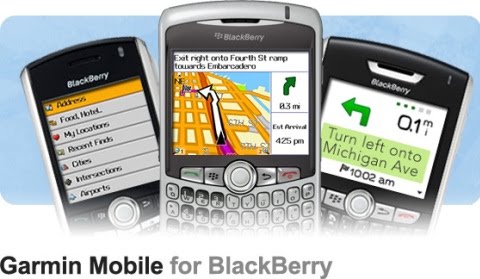
GARMIN MOBILE FOR BLACKBERRY

This application must be in your blackberry. it's verry important
You can download it's bellow


Download Garmin Mobile for Blackberry
Pass: www.toq8.net

3 Secret Buttons Blackberry Curve

The Curve Series is probably the series on the BlackBerry family of the most widely used today. For those of you who just know this smart phone, it's worth trying a few simple tips below

1. Restart Without Removing the Battery

After installing an application or would like to run the new service, there is usually a few adjustments. Well, the most frequently used to solve it is to restart your BB, then remove the battery.

The purpose of this actually means to refresh the memory of the initial BW. However, less effective and was impressed ribet. Actually there was an easier way, ie: press ALT + RIGHT SHIFT + DELETE. This way you can also refresh the memory and reset the BB without wasting time.

2. Clean Memory at Event Logs

Event log on the BlackBerry to show what the system is running. We experienced an error, by looking at the list of event log, the center of the problem can be found. Hence, this method can also be used as a solution when the BB error.

How to access the event log, you first must be on the home screen. Press ALT followed by typing 'LGLG', the event log will soon emerge.

You can free memory that is full of these to speed up your BB. You do this by pressing the HOME and select 'Clear Log'.

3. Switching Applications

One way to quickly and efficiently to move applications is to use ALT + ESC keyboard BB. This feature functions the same as true ALT + TAB key on the computer.

When running an application, press and hold down the ALT key and immediately followed the ESCAPE key (left-right arrows logo trackball). By simply shaking trackball to the right and left, you can also select the desired application. While the application for entry into quite simply by releasing the two.

Good luck ...
 

© 2010 Blogger White Blind Template | Design by Irwan Guswanto


(Back to Top)